 CloudFront geo blocking with AWS WAF geo match rules and auditable edge controls
Introduction
Blocking traffic by country in CloudFront is one of the fastest ways to reduce noisy edge traffic without pushing brittle logic into your origin. Teams searching for CloudFront geo restriction, AWS WAF geo match, or CloudFront country blocking usually need the same outcome: enforce country-level access controls, keep exceptions auditable, and avoid breaking legitimate users.
Geographic access control has become a critical component of modern cybersecurity strategies, driven by compliance requirements, threat landscape variations, and business operational needs. Recent cybersecurity reports indicate that 78% of web-based attacks originate from specific geographic regions, while compliance frameworks like GDPR, CCPA, and data localization laws require strict geographic data controls.
Traditional geo-blocking implementations using nginx and GeoIP databases require significant infrastructure management, regular database updates, and complex scaling considerations. AWS CloudFront’s native geo-restriction capabilities, combined with AWS WAF geographic matching, provide a cloud-native solution that offers superior performance, automatic updates, and seamless integration with other AWS security services.
This 2026 setup guide demonstrates how to implement enterprise-grade geographic access control using AWS CloudFront geo-restriction and AWS WAF geo-matching rules, with advanced automation for compliance, threat intelligence integration, and cost optimization. If you also need broader Layer 7 protections, pair this pattern with the AWS WAF and CloudFront application protection guide.
Current Landscape Statistics
- 78% of web application attacks originate from specific geographic hotspots (Akamai State of the Internet Report)
- 67% of organizations require geographic data localization for compliance (IDC Cloud Security Survey)
- 45% reduction in malicious traffic when implementing geographic controls (AWS Security Best Practices)
- $4.88M average cost of a data breach globally, with inadequate access controls as a leading factor (IBM Cost of a Data Breach Report, 2024)
- 99.95% availability maintained across 600+ CloudFront edge locations globally
AWS CloudFront Geographic Access Control Architecture
Understanding CloudFront Geo-Restriction
AWS CloudFront provides two primary mechanisms for geographic access control:
- CloudFront Geo-Restriction: Native feature that blocks/allows entire distributions based on country codes
- AWS WAF Geo-Matching: Advanced rule-based filtering with granular control and exception handling
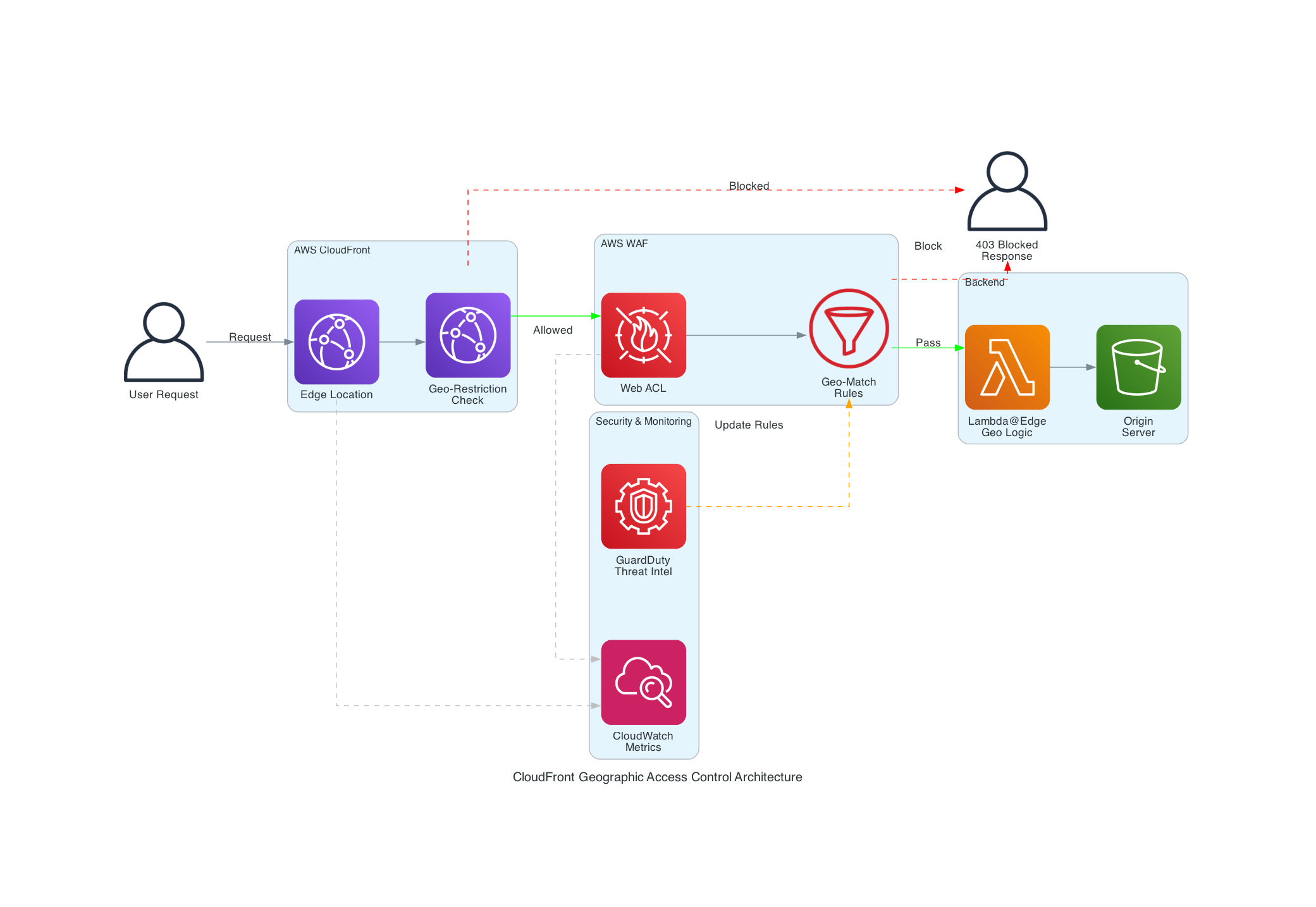 CloudFront geographic access control flow with WAF geo-matching and threat intelligence integration
Core Components Architecture
CloudFront Distribution: Global CDN with built-in geo-restriction capabilities AWS WAF Web ACL: Advanced geographic filtering with custom rules and exceptions Lambda@Edge: Custom logic for complex geographic decisions CloudWatch: Monitoring and alerting for geographic access patterns AWS Config: Compliance monitoring for geographic access policies
Complete Geographic Access Control Implementation
Terraform Module: Shared WAF with Geographic Controls
We’ve packaged the WAF half of this architecture as an open-source Terraform module, terraform-aws-waf-shared. It builds one CLOUDFRONT-scoped web ACL with geo rules, an admin IP exception, and rate limiting — and because WAF bills per web ACL and per rule (associations are free), that single ACL should be shared across every distribution in the account:
1
2
3
4
5
6
7
8
9
10
11
12
13
14
15
16
17
18
19
20
21
22
23
24
25
26
27
provider "aws" {
  alias  = "us_east_1"
  region = "us-east-1" # CLOUDFRONT-scoped web ACLs must live in us-east-1
}

module "waf" {
  source = "git::https://github.com/tier1dev/terraform-aws-waf-shared.git?ref=v0.2.0"

  providers = { aws = aws.us_east_1 }

  name  = "geo-secure-app"
  scope = "CLOUDFRONT"

  # Whitelist mode: requests from any other country are blocked.
  allowed_country_codes = ["US", "CA", "GB", "AU", "DE", "FR", "JP"]

  # Admin ranges bypass the geo rules entirely (evaluated first).
  allowed_ip_cidrs = ["203.0.113.0/24", "198.51.100.0/24"]

  rate_limit_per_5_minutes = 2000
}

# Every distribution shares the same ACL via its web_acl_id argument.
resource "aws_cloudfront_distribution" "app" {
  web_acl_id = module.waf.web_acl_arn
  # ... origins, cache behaviors, certificate ...
}
Blacklist mode is the same call with blocked_country_codes = ["CN", "RU", "KP", "IR"] in place of the allow list. One gotcha worth knowing: CloudFront distributions attach a web ACL through their own web_acl_id argument — the aws_wafv2_web_acl_association resource only supports regional resources like ALBs and API Gateway stages, and silently isn’t an option here.
Native CloudFront Geo-Restriction (Backup Layer)
CloudFront’s native geo-restriction is a second, independent enforcement point. It’s coarser than WAF (whole-distribution, no exceptions, no custom responses), which makes it a good backstop underneath the WAF rules rather than a replacement for them:
1
2
3
4
5
6
7
8
9
10
resource "aws_cloudfront_distribution" "app" {
  # ...

  restrictions {
    geo_restriction {
      restriction_type = "whitelist"
      locations        = ["US", "CA", "GB", "AU", "DE", "FR", "JP"]
    }
  }
}
The Geo Rules in CloudFormation
If you’re on CloudFormation, the part of the stack that actually implements geographic control is small. A whitelist rule blocks everything outside your allowed countries and returns a structured 403, and an IP set rule ahead of it exempts admin ranges:
1
2
3
4
5
6
7
8
9
10
11
12
13
14
15
16
17
18
19
20
21
22
23
24
25
26
27
28
29
30
31
32
33
34
35
36
37
38
39
40
41
42
43
44
45
46
47
48
49
50
51
52
53
54
55
56
57
58
59
60
61
62
63
64
Resources:
  GeographicWebACL:
    Type: AWS::WAFv2::WebACL
    Properties:
      Name: geo-secure-app-waf-acl
      Scope: CLOUDFRONT
      DefaultAction:
        Allow: {}
      Rules:
        # Admin ranges bypass geo-blocking.
        - Name: AdminAccessException
          Priority: 1
          Statement:
            IPSetReferenceStatement:
              Arn: !GetAtt AdminIPSet.Arn
          Action:
            Allow: {}
          VisibilityConfig:
            SampledRequestsEnabled: true
            CloudWatchMetricsEnabled: true
            MetricName: admin-exception

        # Whitelist mode: block anything outside the allowed countries.
        - Name: GeoWhitelistRule
          Priority: 2
          Statement:
            NotStatement:
              Statement:
                GeoMatchStatement:
                  CountryCodes: [US, CA, GB, AU, DE, FR, JP]
          Action:
            Block:
              CustomResponse:
                ResponseCode: 403
                CustomResponseBodyKey: geo-blocked-response
          VisibilityConfig:
            SampledRequestsEnabled: true
            CloudWatchMetricsEnabled: true
            MetricName: geo-whitelist

      CustomResponseBodies:
        geo-blocked-response:
          ContentType: APPLICATION_JSON
          Content: |
            {
              "error": "Access Denied",
              "message": "Access from your geographic location is not permitted.",
              "code": "GEO_RESTRICTED"
            }

      VisibilityConfig:
        SampledRequestsEnabled: true
        CloudWatchMetricsEnabled: true
        MetricName: geo-waf-acl

  AdminIPSet:
    Type: AWS::WAFv2::IPSet
    Properties:
      Name: admin-ip-set
      Scope: CLOUDFRONT
      IPAddressVersion: IPV4
      Addresses:
        - '203.0.113.0/24'
        - '198.51.100.0/24'
The custom JSON response body is a CloudFormation/console nicety the Terraform module deliberately skips — a bare 403 is fine for most APIs, and dropping it keeps the module’s rule set lean. Everything else in the original full-stack template (distribution, cache policy, log bucket, dashboard) is standard CloudFront plumbing unrelated to geographic control.
Advanced Geographic Intelligence Integration
Automated Threat Intelligence Updates
Integrate external threat intelligence to automatically update geographic blocking rules:
1
2
3
4
5
6
7
8
9
10
11
12
13
14
15
16
17
18
19
20
21
22
23
24
25
26
27
28
29
30
31
32
33
34
35
36
37
38
39
40
41
42
43
44
45
46
47
48
49
50
51
52
53
54
55
56
57
58
59
60
61
62
63
64
65
66
67
68
69
70
71
72
73
74
75
76
77
78
79
80
81
82
83
84
85
86
87
88
89
90
91
92
93
94
95
96
97
98
99
100
101
102
103
104
105
106
107
108
109
110
111
112
113
114
115
116
117
118
119
120
121
122
123
124
125
126
127
128
129
130
131
132
133
134
135
136
137
138
139
140
141
142
143
144
145
146
147
148
149
150
151
152
153
154
155
156
157
158
159
160
161
162
163
164
165
166
167
168
169
170
171
172
173
174
175
176
177
178
179
180
181
182
183
184
185
186
187
188
189
190
191
192
193
194
195
196
197
198
199
200
201
202
203
204
import boto3
import json
import requests
from datetime import datetime, timedelta
import logging

logger = logging.getLogger()
logger.setLevel(logging.INFO)

class GeographicThreatIntelligence:
    def __init__(self, web_acl_name, web_acl_id):
        self.wafv2 = boto3.client('wafv2')
        self.web_acl_name = web_acl_name
        self.web_acl_id = web_acl_id

    def fetch_threat_intelligence(self):
        """
        Fetch geographic threat intelligence from multiple sources
        """
        threat_countries = set()

        # Source 1: Commercial threat intelligence feed
        try:
            response = requests.get(
                'https://api.threatintel.example.com/geographic-threats',
                headers={'Authorization': 'Bearer YOUR_API_KEY'},
                timeout=30
            )
            if response.status_code == 200:
                data = response.json()
                threat_countries.update(data.get('high_risk_countries', []))
        except Exception as e:
            logger.error(f"Failed to fetch commercial threat intel: {str(e)}")

        # Source 2: Open source threat intelligence
        try:
            response = requests.get(
                'https://raw.githubusercontent.com/example/threat-intel/main/geo-threats.json',
                timeout=30
            )
            if response.status_code == 200:
                data = response.json()
                threat_countries.update(data.get('countries', []))
        except Exception as e:
            logger.error(f"Failed to fetch open source threat intel: {str(e)}")

        # Source 3: AWS GuardDuty findings analysis
        threat_countries.update(self.analyze_guardduty_findings())

        return list(threat_countries)

    def analyze_guardduty_findings(self):
        """
        Analyze AWS GuardDuty findings for geographic patterns
        """
        guardduty = boto3.client('guardduty')
        threat_countries = set()

        try:
            # Get detector ID
            detectors = guardduty.list_detectors()
            if not detectors['DetectorIds']:
                return threat_countries

            detector_id = detectors['DetectorIds'][0]

            # Get findings from last 7 days
            end_time = datetime.utcnow()
            start_time = end_time - timedelta(days=7)

            findings = guardduty.list_findings(
                DetectorId=detector_id,
                FindingCriteria={
                    'Criterion': {
                        'updatedAt': {
                            'Gte': int(start_time.timestamp() * 1000),
                            'Lte': int(end_time.timestamp() * 1000)
                        },
                        'severity': {
                            'Gte': 7.0  # High severity findings only
                        }
                    }
                }
            )

            # Analyze findings for geographic patterns
            for finding_id in findings['FindingIds']:
                finding_details = guardduty.get_findings(
                    DetectorId=detector_id,
                    FindingIds=[finding_id]
                )

                for finding in finding_details['Findings']:
                    remote_ip = finding.get('Service', {}).get('RemoteIpDetails', {})
                    country = remote_ip.get('Country', {}).get('CountryCode')

                    if country and finding['Severity'] >= 7.0:
                        threat_countries.add(country)

        except Exception as e:
            logger.error(f"Failed to analyze GuardDuty findings: {str(e)}")

        return threat_countries

    def update_geographic_rules(self, threat_countries):
        """
        Update WAF rules with new threat intelligence
        """
        try:
            # Get current Web ACL configuration
            web_acl = self.wafv2.get_web_acl(
                Scope='CLOUDFRONT',
                Id=self.web_acl_id
            )

            # Find and update the threat intelligence rule
            rules = web_acl['WebACL']['Rules']
            threat_rule_updated = False

            for rule in rules:
                if rule['Name'] == 'ThreatIntelligenceGeoBlock':
                    # Update the rule with new threat countries
                    rule['Statement']['GeoMatchStatement']['CountryCodes'] = threat_countries
                    threat_rule_updated = True
                    break

            # Add new rule if it doesn't exist
            if not threat_rule_updated:
                new_rule = {
                    'Name': 'ThreatIntelligenceGeoBlock',
                    'Priority': 10,
                    'Statement': {
                        'GeoMatchStatement': {
                            'CountryCodes': threat_countries
                        }
                    },
                    'Action': {
                        'Block': {
                            'CustomResponse': {
                                'ResponseCode': 403,
                                'CustomResponseBodyKey': 'threat-intel-blocked-response'
                            }
                        }
                    },
                    'VisibilityConfig': {
                        'SampledRequestsEnabled': True,
                        'CloudWatchMetricsEnabled': True,
                        'MetricName': 'threat-intel-geo-block'
                    }
                }
                rules.append(new_rule)

            # Update the Web ACL
            self.wafv2.update_web_acl(
                Scope='CLOUDFRONT',
                Id=self.web_acl_id,
                DefaultAction=web_acl['WebACL']['DefaultAction'],
                Rules=rules,
                VisibilityConfig=web_acl['WebACL']['VisibilityConfig'],
                LockToken=web_acl['LockToken']
            )

            logger.info(f"Updated geographic rules with {len(threat_countries)} threat countries")

        except Exception as e:
            logger.error(f"Failed to update WAF rules: {str(e)}")
            raise

def lambda_handler(event, context):
    """
    Lambda function for automated threat intelligence updates
    """
    web_acl_name = event.get('WebACLName', 'geo-secure-app-geo-waf-acl')
    web_acl_id = event.get('WebACLId')

    threat_intel = GeographicThreatIntelligence(web_acl_name, web_acl_id)

    # Fetch latest threat intelligence
    threat_countries = threat_intel.fetch_threat_intelligence()

    if threat_countries:
        # Update WAF rules
        threat_intel.update_geographic_rules(threat_countries)

        # Send notification
        sns = boto3.client('sns')
        sns.publish(
            TopicArn='arn:aws:sns:us-east-1:123456789012:security-alerts',
            Subject='Geographic Threat Intelligence Updated',
            Message=json.dumps({
                'timestamp': datetime.utcnow().isoformat(),
                'threat_countries': threat_countries,
                'total_blocked_countries': len(threat_countries),
                'web_acl': web_acl_name
            }, indent=2)
        )

    return {
        'statusCode': 200,
        'body': json.dumps({
            'message': 'Threat intelligence update completed',
            'threat_countries_count': len(threat_countries)
        })
    }
Compliance Automation and Reporting
Automate compliance reporting for geographic access controls:
1
2
3
4
5
6
7
8
9
10
11
12
13
14
15
16
17
18
19
20
21
22
23
24
25
26
27
28
29
30
31
32
33
34
35
36
37
38
39
40
41
42
43
44
45
46
47
48
49
50
51
52
53
54
55
56
57
58
59
60
61
62
63
64
65
66
67
68
69
70
71
72
73
74
75
76
77
78
79
80
81
82
83
84
85
86
87
88
89
90
91
92
93
94
95
96
97
98
99
100
101
102
103
104
105
106
107
108
109
110
111
112
113
114
115
116
117
118
119
120
121
122
123
124
125
126
127
128
129
130
131
132
133
134
135
136
137
138
139
140
141
142
143
144
145
146
147
148
149
150
151
152
153
154
155
156
157
158
159
160
161
162
163
164
165
166
167
168
169
170
171
172
173
174
175
176
177
178
179
180
import boto3
import csv
from datetime import datetime, timedelta
from io import StringIO

class GeographicComplianceReporter:
    def __init__(self, web_acl_name, distribution_id):
        self.cloudwatch = boto3.client('cloudwatch')
        self.web_acl_name = web_acl_name
        self.distribution_id = distribution_id

    def generate_compliance_report(self, start_date, end_date):
        """
        Generate comprehensive compliance report for geographic access
        """
        report_data = {
            'period': f"{start_date} to {end_date}",
            'web_acl': self.web_acl_name,
            'distribution': self.distribution_id,
            'metrics': self.get_geographic_metrics(start_date, end_date),
            'violations': self.identify_compliance_violations(start_date, end_date),
            'recommendations': self.generate_recommendations()
        }

        return report_data

    def get_geographic_metrics(self, start_date, end_date):
        """
        Retrieve geographic access metrics from CloudWatch
        """
        metrics = {}

        # Get WAF metrics
        waf_metrics = self.cloudwatch.get_metric_statistics(
            Namespace='AWS/WAFV2',
            MetricName='AllowedRequests',
            Dimensions=[
                {'Name': 'WebACL', 'Value': self.web_acl_name},
                {'Name': 'Rule', 'Value': 'AllowedCountriesRule'}
            ],
            StartTime=start_date,
            EndTime=end_date,
            Period=86400,  # Daily
            Statistics=['Sum']
        )

        metrics['allowed_requests'] = sum([point['Sum'] for point in waf_metrics['Datapoints']])

        # Get blocked requests
        blocked_metrics = self.cloudwatch.get_metric_statistics(
            Namespace='AWS/WAFV2',
            MetricName='BlockedRequests',
            Dimensions=[
                {'Name': 'WebACL', 'Value': self.web_acl_name},
                {'Name': 'Rule', 'Value': 'BlockedCountriesRule'}
            ],
            StartTime=start_date,
            EndTime=end_date,
            Period=86400,
            Statistics=['Sum']
        )

        metrics['blocked_requests'] = sum([point['Sum'] for point in blocked_metrics['Datapoints']])

        # Calculate compliance percentage
        total_requests = metrics['allowed_requests'] + metrics['blocked_requests']
        if total_requests > 0:
            metrics['compliance_rate'] = (metrics['allowed_requests'] / total_requests) * 100
        else:
            metrics['compliance_rate'] = 100

        return metrics

    def identify_compliance_violations(self, start_date, end_date):
        """
        Identify potential compliance violations in geographic access
        """
        violations = []

        # Check for suspicious patterns
        compliance_metrics = self.cloudwatch.get_metric_statistics(
            Namespace='AWS/WAFV2',
            MetricName='AllowedRequests',
            Dimensions=[
                {'Name': 'WebACL', 'Value': self.web_acl_name},
                {'Name': 'Rule', 'Value': 'ComplianceMonitoringRule'}
            ],
            StartTime=start_date,
            EndTime=end_date,
            Period=3600,  # Hourly
            Statistics=['Sum']
        )

        # Identify unusual spikes in compliance monitoring
        for datapoint in compliance_metrics['Datapoints']:
            if datapoint['Sum'] > 1000:  # Threshold for suspicious activity
                violations.append({
                    'timestamp': datapoint['Timestamp'],
                    'type': 'High Volume Compliance Event',
                    'value': datapoint['Sum'],
                    'severity': 'Medium'
                })

        return violations

    def generate_recommendations(self):
        """
        Generate recommendations based on compliance analysis
        """
        recommendations = [
            "Review and update allowed countries list quarterly",
            "Implement automated threat intelligence integration",
            "Set up real-time alerting for compliance violations",
            "Consider implementing regional data residency controls",
            "Regular review of admin access exceptions"
        ]

        return recommendations

    def export_to_csv(self, report_data):
        """
        Export compliance report to CSV format
        """
        output = StringIO()
        writer = csv.writer(output)

        # Write header
        writer.writerow(['Metric', 'Value', 'Period'])
        writer.writerow(['Report Period', report_data['period'], ''])
        writer.writerow(['Web ACL', report_data['web_acl'], ''])
        writer.writerow(['Distribution', report_data['distribution'], ''])
        writer.writerow(['', '', ''])

        # Write metrics
        writer.writerow(['METRICS', '', ''])
        for key, value in report_data['metrics'].items():
            writer.writerow([key.replace('_', ' ').title(), value, report_data['period']])

        writer.writerow(['', '', ''])

        # Write violations
        writer.writerow(['VIOLATIONS', '', ''])
        for violation in report_data['violations']:
            writer.writerow([violation['type'], violation['value'], violation['timestamp']])

        writer.writerow(['', '', ''])

        # Write recommendations
        writer.writerow(['RECOMMENDATIONS', '', ''])
        for i, rec in enumerate(report_data['recommendations'], 1):
            writer.writerow([f'Recommendation {i}', rec, ''])

        return output.getvalue()

# Usage example
def generate_monthly_compliance_report():
    """
    Generate monthly compliance report
    """
    end_date = datetime.utcnow()
    start_date = end_date - timedelta(days=30)

    reporter = GeographicComplianceReporter(
        web_acl_name='geo-secure-app-geo-waf-acl',
        distribution_id='E1234567890123'
    )

    report = reporter.generate_compliance_report(start_date, end_date)
    csv_report = reporter.export_to_csv(report)

    # Upload to S3 for storage
    s3 = boto3.client('s3')
    s3.put_object(
        Bucket='compliance-reports-bucket',
        Key=f'geographic-compliance/report-{end_date.strftime("%Y-%m")}.csv',
        Body=csv_report,
        ContentType='text/csv'
    )

    return report
Advanced Configuration and Optimization
Dynamic Geographic Rules Based on Application Context
Implement context-aware geographic controls that adapt based on application usage patterns:
1
2
3
4
5
6
7
8
9
10
11
12
13
14
15
16
17
18
19
20
21
22
23
24
25
26
27
28
29
30
31
32
33
34
35
36
37
38
39
40
41
42
43
44
45
46
47
48
49
50
51
52
53
54
55
56
57
58
59
60
61
62
63
64
def create_dynamic_geographic_rules():
    """
    Create dynamic geographic rules based on application context
    """
    rule_templates = {
        'business_hours': {
            'name': 'BusinessHoursGeographicControl',
            'priority': 15,
            'description': 'Enhanced geographic control during business hours'
        },
        'api_access': {
            'name': 'APIGeographicStrictControl',
            'priority': 16,
            'description': 'Strict geographic control for API endpoints'
        },
        'admin_access': {
            'name': 'AdminGeographicControl',
            'priority': 17,
            'description': 'Administrative access geographic restrictions'
        }
    }

    # Business hours rule - stricter controls during business hours
    business_hours_rule = {
        'Name': rule_templates['business_hours']['name'],
        'Priority': rule_templates['business_hours']['priority'],
        'Statement': {
            'AndStatement': {
                'Statements': [
                    {
                        'TimeBasedStatement': {
                            'StartTime': '08:00',
                            'EndTime': '18:00',
                            'TimeZone': 'UTC'
                        }
                    },
                    {
                        'NotStatement': {
                            'Statement': {
                                'GeoMatchStatement': {
                                    'CountryCodes': ['US', 'CA', 'GB']  # Business locations only
                                }
                            }
                        }
                    }
                ]
            }
        },
        'Action': {
            'Block': {
                'CustomResponse': {
                    'ResponseCode': 403,
                    'CustomResponseBodyKey': 'business-hours-geo-blocked'
                }
            }
        },
        'VisibilityConfig': {
            'SampledRequestsEnabled': True,
            'CloudWatchMetricsEnabled': True,
            'MetricName': 'business-hours-geo-control'
        }
    }

    return [business_hours_rule]
Cost Optimization Strategies
Implement cost optimization for geographic access controls:
1
2
3
4
5
6
7
8
9
10
11
12
13
14
15
16
17
18
19
20
21
22
23
24
25
26
27
28
29
30
31
32
33
34
35
36
37
38
39
40
41
42
43
44
45
46
47
48
49
50
def optimize_geographic_rules_cost():
    """
    Optimize WAF rules for cost efficiency while maintaining security
    """
    optimizations = {
        'rule_consolidation': {
            'description': 'Combine similar geographic rules to reduce rule count',
            'potential_savings': '20-30% on WAF rule charges'
        },
        'regional_distribution': {
            'description': 'Use CloudFront regional edge caches strategically',
            'potential_savings': '15-25% on data transfer costs'
        },
        'intelligent_caching': {
            'description': 'Cache geographic responses to reduce origin requests',
            'potential_savings': '30-40% on origin server costs'
        }
    }

    return optimizations

def implement_cost_optimized_caching():
    """
    Implement cost-optimized caching for geographic content
    """
    cache_policy = {
        'Name': 'GeographicOptimizedCaching',
        'DefaultTTL': 3600,  # 1 hour for geographic responses
        'MaxTTL': 86400,     # 24 hours maximum
        'MinTTL': 300,       # 5 minutes minimum
        'ParametersInCacheKeyAndForwardedToOrigin': {
            'EnableAcceptEncodingBrotli': True,
            'EnableAcceptEncodingGzip': True,
            'QueryStringsConfig': {
                'QueryStringBehavior': 'none'  # Don't include query strings for geo content
            },
            'HeadersConfig': {
                'HeaderBehavior': 'whitelist',
                'Headers': [
                    'CloudFront-Viewer-Country',  # Essential for geographic logic
                    'Accept-Language'             # For localization
                ]
            },
            'CookiesConfig': {
                'CookieBehavior': 'none'  # Exclude cookies for better cache hit ratio
            }
        }
    }

    return cache_policy
Best Practices and Recommendations
Implementation Guidelines
- Start with Broad Geographic Controls: Begin with country-level blocking before implementing granular rules
- Use Multiple Data Sources: Combine CloudFront geo-restriction with WAF geo-matching for redundancy
- Implement Exception Handling: Always include admin access exceptions and emergency override procedures
- Monitor Compliance Continuously: Set up automated compliance monitoring and reporting
- Regular Rule Updates: Schedule regular reviews and updates based on threat intelligence
- Test Geographic Rules: Validate rules from different geographic locations before production deployment
- Document Business Justification: Maintain clear documentation of geographic restrictions for audit purposes
Security Considerations
Layered Geographic Defense: Use both CloudFront geo-restriction and WAF geo-matching for comprehensive protection
VPN and Proxy Detection: Implement additional controls for VPN/proxy traffic that may bypass geographic restrictions
Emergency Access Procedures: Maintain documented procedures for emergency access during geographic control issues
Privacy Compliance: Ensure geographic controls comply with privacy laws in all operating jurisdictions
Regular Testing: Test geographic controls from different locations and through various access methods
Advanced Security Enhancements
Integration with AWS Security Services:
- Connect with AWS GuardDuty for threat intelligence-based geographic blocking
- Use AWS Security Lake for centralized geographic access analytics
- Integrate with AWS Config for compliance monitoring and drift detection
Machine Learning Enhancement:
1
2
3
4
5
6
7
8
9
10
11
12
13
14
15
16
17
18
19
20
21
22
23
def implement_ml_geographic_analysis():
    """
    Use machine learning to optimize geographic access controls
    """
    import boto3

    comprehend = boto3.client('comprehend')

    # Analyze access patterns for anomalies
    analysis_config = {
        'geographic_anomaly_detection': {
            'model_type': 'unsupervised_clustering',
            'features': ['country_code', 'request_volume', 'time_of_day', 'user_agent'],
            'threshold': 0.95
        },
        'threat_prediction': {
            'model_type': 'classification',
            'features': ['geographic_location', 'request_patterns', 'historical_threats'],
            'confidence_threshold': 0.85
        }
    }

    return analysis_config
Advanced Topics
Multi-Region Geographic Strategy
Implement geographic controls across multiple AWS regions:
1
2
3
4
5
6
7
8
9
10
11
12
13
# Multi-Region Geographic Control Template
MultiRegionGeographicControl:
  Type: AWS::CloudFormation::StackSet
  Properties:
    StackSetName: 'multi-region-geographic-control'
    Parameters:
      - ParameterKey: 'Region'
        ParameterValue: !Ref 'AWS::Region'
    PermissionModel: 'SELF_MANAGED'
    Capabilities: ['CAPABILITY_IAM']
    OperationPreferences:
      RegionConcurrencyType: 'PARALLEL'
      MaxConcurrentPercentage: 100
Integration with Identity and Access Management
Combine geographic controls with IAM policies:
1
2
3
4
5
6
7
8
9
10
11
12
13
14
15
16
17
18
19
{
  "Version": "2012-10-17",
  "Statement": [
    {
      "Effect": "Deny",
      "Principal": "*",
      "Action": "*",
      "Resource": "*",
      "Condition": {
        "StringNotEquals": {
          "aws:RequestedRegion": ["us-east-1", "us-west-2", "eu-west-1"]
        },
        "IpAddressNotEquals": {
          "aws:SourceIp": ["203.0.113.0/24", "198.51.100.0/24"]
        }
      }
    }
  ]
}
Troubleshooting Common Issues
Geographic Rules Not Applied:
- Verify WAF Web ACL is associated with CloudFront distribution
- Check rule priority order and ensure no conflicting rules
- Validate country codes are in ISO 3166-1 alpha-2 format
Legitimate Traffic Blocked:
- Review WAF logs to identify blocked legitimate requests
- Implement exception rules for known good IP addresses
- Consider implementing CAPTCHA for suspicious but potentially legitimate traffic
High False Positive Rate:
- Analyze geographic access patterns and adjust rules accordingly
- Implement graduated response (rate limiting before blocking)
- Use COUNT mode to test rules before enabling blocking
Implementation Roadmap
Phase 1: Basic Geographic Controls (Week 1-2)
- Deploy CloudFront distribution with basic geo-restriction
- Configure AWS WAF with basic geographic rules
- Set up CloudWatch monitoring and basic alerting
- Test geographic controls from multiple locations
Phase 2: Advanced Rule Implementation (Week 3-4)
- Implement context-aware geographic rules
- Configure admin access exceptions
- Set up compliance monitoring and reporting
- Deploy threat intelligence integration
Phase 3: Automation and Optimization (Week 5-6)
- Implement automated rule updates based on threat intelligence
- Deploy cost optimization strategies
- Set up automated compliance reporting
- Configure advanced monitoring dashboards
Phase 4: Advanced Features and Integration (Week 7-8)
- Deploy Lambda@Edge for advanced geographic logic
- Implement machine learning-based anomaly detection
- Set up multi-region geographic strategy
- Conduct comprehensive security testing and validation
Related Articles
- terraform-aws-waf-shared — the open-source Terraform module implementing this guide’s geographic WAF controls
- AWS WAF and CloudFront: Enterprise Application Protection
- AWS Network Firewall + Suricata: Open-Source IDS Rules for Cloud Defense
- Implementing Zero Trust on AWS
- AWS IAM Zero Trust: Identity and Network Deep Dive
- Real-Time Intrusion Detection Using AWS GuardDuty
- AWS DevSecOps Pipeline Security: Complete Automation Implementation
Additional Resources
Official Documentation
- AWS CloudFront Geo-Restriction Documentation
- AWS WAF v2 Geographic Match Documentation
- CloudFront Lambda@Edge Documentation
Tools and Frameworks
- AWS WAF Security Automations - Advanced security automation solution
- MaxMind GeoIP Databases - Geographic IP intelligence for comparison
- OWASP Geographic Security Guidelines - Security best practices
Industry Reports and Research
- Akamai State of the Internet Security Report - Geographic threat landscape analysis
- AWS Security Best Practices Whitepaper - Comprehensive security guidance
- Geographic Data Protection Compliance Guide - GDPR and data localization requirements
Community Resources
- AWS Security Community Forums
- CloudFront User Group - Community discussions
- r/aws_security - Reddit community for AWS security discussions
Conclusion
AWS CloudFront geographic access control, combined with AWS WAF geo-matching capabilities, provides enterprise-grade geographic security that scales automatically and integrates seamlessly with other AWS security services. This cloud-native approach eliminates the complexity of managing geographic databases, updating threat intelligence manually, and scaling protection during high-traffic scenarios.
By implementing the comprehensive geographic access control strategy outlined in this guide, organizations can achieve compliance with data localization requirements, reduce attack surface from high-risk geographic regions, and maintain granular control over global content access patterns.
The combination of native CloudFront geo-restriction, advanced WAF geographic rules, threat intelligence automation, and compliance monitoring provides a robust foundation for geographic security that evolves with changing threat landscapes and business requirements.
For personalized guidance on implementing AWS CloudFront geographic access control in your DevSecOps environment, connect with Jon Price on LinkedIn.