Introduction
Pairing AWS WAF with CloudFront is the fastest way to put a managed web application firewall in front of your edge and block the OWASP Top 10 before malicious traffic ever reaches your origin. Web application attacks continue to evolve at an unprecedented pace, and generative-AI tooling has lowered the barrier to entry even further — automated scanners now weaponize newly disclosed CVEs within hours. According to recent industry research, 74% of web applications still ship with at least one exploitable vulnerability, and web application and API attacks remain the single largest breach vector heading into 2026.
Traditional approaches using nginx and ModSecurity, while effective, require significant infrastructure management, patching, and scaling considerations. AWS WAF, a managed web application firewall integrated with Amazon CloudFront, provides a cloud-native alternative that addresses these challenges while offering superior performance, automatic scaling, and reduced operational overhead. Because the WAF web ACL is evaluated at CloudFront’s global edge, CloudFront WAF protection stops attacks in the nearest point of presence rather than at a single regional choke point.
This comprehensive guide demonstrates how to protect CloudFront with WAF end to end: associating a web ACL, tuning AWS WAF rules for CloudFront distributions, and layering managed rule groups, rate limiting, and geo-blocking to defend against SQL injection, cross-site scripting (XSS), volumetric CloudFront DDoS protection scenarios, and the complete OWASP Top 10 vulnerability categories.
Current Landscape Statistics (2026)
- 74% of web applications contain at least one exploitable vulnerability (Veracode State of Software Security, 2025)
- Web application and API attacks remain the top breach pattern in the 2025 Verizon DBIR, with exploited vulnerabilities up 34% year over year
- $4.88M average cost of a data breach, with web-facing applications among the costliest initial vectors (IBM Cost of a Data Breach, 2024)
- AWS reports mitigating record-setting hyper-volumetric DDoS events — including layer-3/4 floods exceeding 3 Tbps — absorbed at the CloudFront and AWS Shield edge in 2024–2025
- 99.9%+ availability backed by CloudFront’s global network of 700+ points of presence across 100+ cities
AWS WAF Web Application Firewall Architecture and Core Components
Understanding AWS WAF v2 Architecture
AWS WAF v2 is a managed web application firewall that integrates seamlessly with CloudFront, Application Load Balancer (ALB), API Gateway, AWS App Runner, and Amazon Cognito user pools. Unlike traditional solutions, an AWS WAF CloudFront deployment operates at the edge through CloudFront’s global network, providing protection before traffic reaches your origin servers. When you associate a web ACL with a CloudFront distribution, its scope must be CLOUDFRONT and the web ACL must live in the us-east-1 region, even though the rules are enforced globally at every edge location.
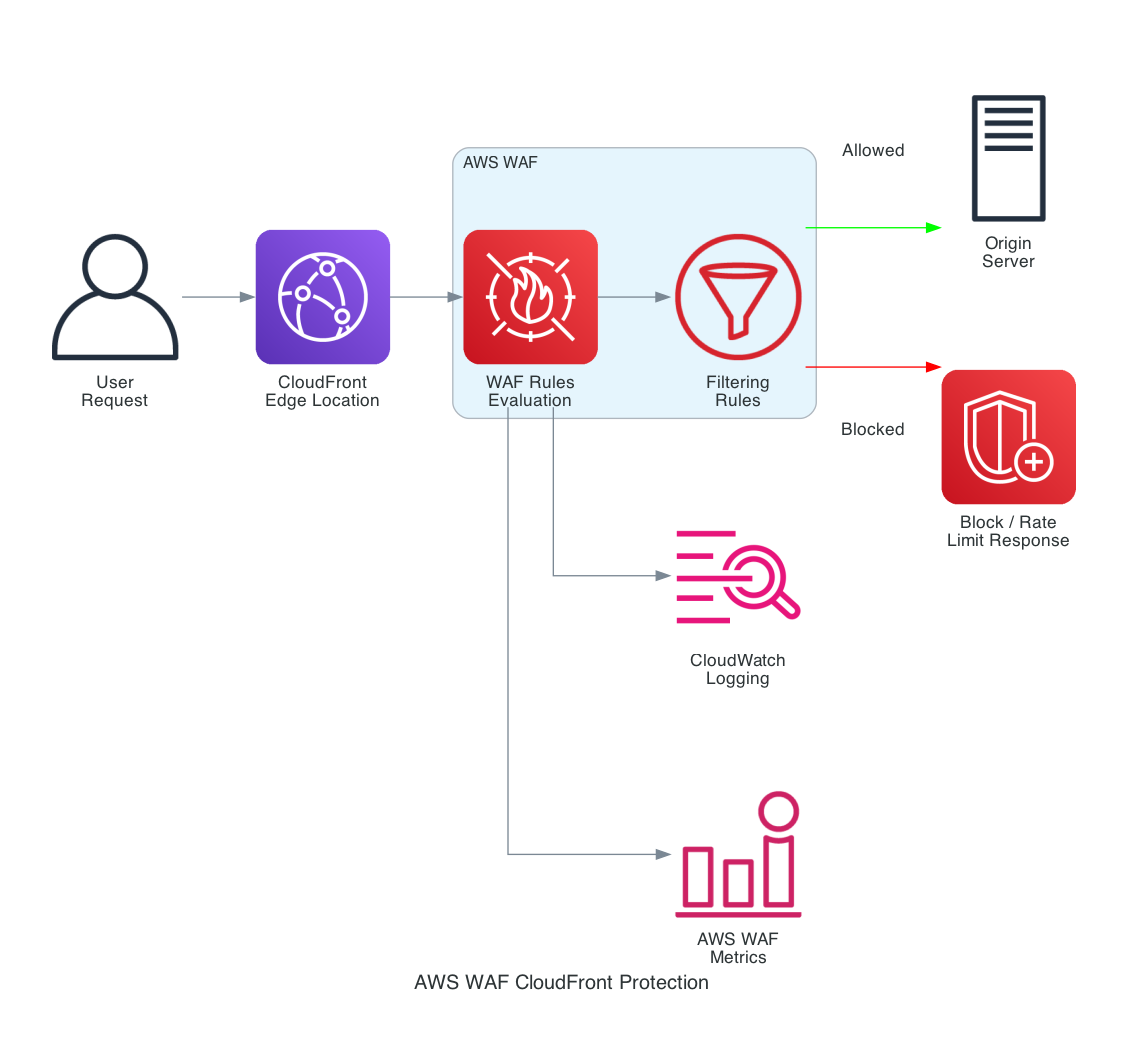 AWS WAF and CloudFront application protection flow
Key AWS WAF Components
Web ACLs (Access Control Lists): Container for rules and rule groups that define the filtering logic Rules: Define conditions for inspecting web requests (IP addresses, HTTP headers, URI strings, SQL code, XSS scripts) Rule Groups: Collections of rules that can be reused across multiple Web ACLs IP Sets: Collections of IP addresses and IP address ranges for efficient IP-based filtering Regex Pattern Sets: Regular expression patterns for advanced string matching
Protect CloudFront with WAF: OWASP Top 10 and CloudFront DDoS Protection
To protect CloudFront with WAF against the OWASP Top 10, you combine AWS managed rule groups (which AWS keeps current as new attack signatures emerge) with a rate-based rule that provides application-layer CloudFront DDoS protection on top of the always-on network-layer defense from AWS Shield Standard.
Core Rule Groups Configuration
AWS provides managed rule groups that specifically target OWASP Top 10 vulnerabilities. We ship this exact configuration as an open-source Terraform module, terraform-aws-waf-shared: one CLOUDFRONT-scoped web ACL carrying the managed rule groups, rate limiting, and geo controls, shared across every distribution in the account. WAF bills per web ACL and per rule, but associating an existing ACL with another resource is free — so a single shared ACL is both the cheapest and the most consistent way to run these protections:
1
2
3
4
5
6
7
8
9
10
11
12
13
14
15
16
17
18
19
20
21
22
23
24
25
26
27
28
29
30
31
32
33
provider "aws" {
  alias  = "us_east_1"
  region = "us-east-1" # CLOUDFRONT-scoped web ACLs must live in us-east-1
}

module "waf" {
  source = "git::https://github.com/tier1dev/terraform-aws-waf-shared.git?ref=v0.2.0"

  providers = { aws = aws.us_east_1 }

  name  = "secure-webapp"
  scope = "CLOUDFRONT"

  managed_rule_groups = [
    { name = "AWSManagedRulesCommonRuleSet" },
    { name = "AWSManagedRulesKnownBadInputsRuleSet" },
    { name = "AWSManagedRulesSQLiRuleSet" },
    { name = "AWSManagedRulesLinuxRuleSet" },
    { name = "AWSManagedRulesAmazonIpReputationList" },
    # Evaluate in count mode first; promote to enforcing once false
    # positives are tuned out.
    { name = "AWSManagedRulesAnonymousIpList", override_action = "count" },
  ]

  allowed_country_codes    = ["US", "CA", "GB"]
  rate_limit_per_5_minutes = 2000
}

# Each distribution attaches the shared ACL via web_acl_id.
resource "aws_cloudfront_distribution" "app" {
  web_acl_id = module.waf.web_acl_arn
  # ... origins, cache behaviors, certificate ...
}
The same module handles ALBs and API Gateway stages: instantiate it a second time with scope = "REGIONAL" and pass their ARNs to association_resource_arns.
If you’re deploying with CloudFormation instead, every managed rule group in the web ACL follows the same shape — the rest of the original template is repetition of this block plus standard CloudFront plumbing:
1
2
3
4
5
6
7
8
9
10
11
12
13
# One entry per managed rule group inside the WebACL Rules list:
- Name: AWSManagedRulesCommonRuleSet
  Priority: 3
  OverrideAction:
    None: {}          # use Count: {} to evaluate without blocking
  Statement:
    ManagedRuleGroupStatement:
      VendorName: AWS
      Name: AWSManagedRulesCommonRuleSet
  VisibilityConfig:
    SampledRequestsEnabled: true
    CloudWatchMetricsEnabled: true
    MetricName: common-ruleset
Attach the ACL to the distribution with WebACLId: !GetAtt WebApplicationFirewall.Arn in the DistributionConfig, exactly as the Terraform example does with web_acl_id.
AWS WAF Rules for CloudFront: Advanced Customization and Tuning
Beyond the managed baseline, AWS WAF rules for CloudFront can be tailored to your application’s specific request patterns. Start every custom rule in Count mode, review the sampled requests in the WAF console for false positives, then promote it to Block — this evaluate-first workflow keeps legitimate traffic flowing while you tighten CloudFront WAF protection.
Custom SQL Injection Detection
While AWS managed rules provide excellent baseline protection, you may need custom rules for application-specific SQL injection patterns:
1
2
3
4
5
6
7
8
9
10
11
12
13
14
15
16
17
18
19
20
21
22
23
24
25
26
27
28
29
30
31
32
33
34
35
36
37
38
39
40
41
42
43
44
45
46
47
48
49
# Custom SQL Injection Rule Example
CustomSQLiRule:
  Type: AWS::WAFv2::WebACL
  Properties:
    Rules:
      - Name: CustomSQLInjectionRule
        Priority: 10
        Statement:
          OrStatement:
            Statements:
              # Detect SQL keywords in query parameters
              - ByteMatchStatement:
                  SearchString: 'union select'
                  FieldToMatch:
                    AllQueryArguments: {}
                  TextTransformations:
                    - Priority: 1
                      Type: URL_DECODE
                    - Priority: 2
                      Type: LOWERCASE
                  PositionalConstraint: CONTAINS

              # Detect SQL comments
              - ByteMatchStatement:
                  SearchString: '--'
                  FieldToMatch:
                    AllQueryArguments: {}
                  TextTransformations:
                    - Priority: 1
                      Type: URL_DECODE
                  PositionalConstraint: CONTAINS

              # Detect SQL functions
              - RegexMatchStatement:
                  RegexString: '(?i)(concat|substring|ascii|char|user|database|version)\s*\('
                  FieldToMatch:
                    AllQueryArguments: {}
                  TextTransformations:
                    - Priority: 1
                      Type: URL_DECODE
                    - Priority: 2
                      Type: HTML_ENTITY_DECODE

        Action:
          Block: {}
        VisibilityConfig:
          SampledRequestsEnabled: true
          CloudWatchMetricsEnabled: true
          MetricName: 'custom-sqli-rule'
Advanced XSS Protection
Implement sophisticated XSS detection that goes beyond standard patterns:
1
2
3
4
5
6
7
8
9
10
11
12
13
14
15
16
17
18
19
20
21
22
23
24
25
26
27
28
29
30
31
32
33
34
35
36
37
38
39
40
41
42
43
44
45
46
47
# Advanced XSS Detection Rules
AdvancedXSSRules:
  - Name: XSSPatternDetection
    Priority: 11
    Statement:
      OrStatement:
        Statements:
          # JavaScript event handlers
          - RegexMatchStatement:
              RegexString: '(?i)on(load|error|click|mouse|focus|blur|change|submit|reset|select|resize|scroll)='
              FieldToMatch:
                Body: {}
              TextTransformations:
                - Priority: 1
                  Type: URL_DECODE
                - Priority: 2
                  Type: HTML_ENTITY_DECODE

          # Script tag variations
          - RegexMatchStatement:
              RegexString: '(?i)<script[^>]*>.*?</script>'
              FieldToMatch:
                Body: {}
              TextTransformations:
                - Priority: 1
                  Type: URL_DECODE
                - Priority: 2
                  Type: HTML_ENTITY_DECODE

          # JavaScript pseudo protocol
          - ByteMatchStatement:
              SearchString: 'javascript:'
              FieldToMatch:
                AllQueryArguments: {}
              TextTransformations:
                - Priority: 1
                  Type: URL_DECODE
                - Priority: 2
                  Type: LOWERCASE
              PositionalConstraint: CONTAINS

    Action:
      Block: {}
    VisibilityConfig:
      SampledRequestsEnabled: true
      CloudWatchMetricsEnabled: true
      MetricName: 'advanced-xss-protection'
CloudFront WAF Protection: Managed Rules, Rate Limiting, and Geo-Blocking
A production CloudFront WAF protection strategy layers four independent controls so that a bypass of one does not expose the origin. This section expands on the managed rule groups, rate-based rules, geo-blocking, and logging that turn a bare web ACL into defense-in-depth.
AWS Managed Rule Groups Reference (2026)
AWS-managed rule groups are versioned, automatically updated, and priced at no additional rule cost beyond the standard web ACL and request fees. The groups most teams enable on a CloudFront distribution are:
| Managed Rule Group | Purpose | WCU Cost |
|---|---|---|
AWSManagedRulesCommonRuleSet (CRS) |
Core OWASP protections — broad XSS, LFI, and protocol enforcement | 700 |
AWSManagedRulesKnownBadInputsRuleSet |
Blocks request patterns tied to known exploits and CVEs (e.g., Log4Shell/Log4JRCE, Spring4Shell) |
200 |
AWSManagedRulesSQLiRuleSet |
Targeted SQL injection detection across query string, body, and headers | 200 |
AWSManagedRulesAmazonIpReputationList |
Drops traffic from Amazon threat-intelligence IP feeds | 25 |
AWSManagedRulesAnonymousIpList |
Blocks VPNs, Tor exit nodes, and hosting-provider egress | 50 |
AWSManagedRulesBotControlRuleSet |
Bot Control — signature and ML-based bot classification (targeted inspection level) | 50 |
A CloudFront-scoped web ACL has a 5,000 WCU capacity budget, so track the cumulative WCU cost as you stack groups. Enable the Log4JRCE rule inside Known Bad Inputs explicitly — the persistence of Log4Shell exploitation attempts years after disclosure is a reminder that managed groups are only as good as the versions you keep current.
Rate-Based Rules for Application-Layer DDoS Protection
AWS Shield Standard automatically defends every CloudFront distribution against layer-3/4 volumetric floods at no cost. Rate-based WAF rules add the layer-7 dimension — throttling request floods, credential stuffing, and scraping. AWS WAF now supports aggregating the rate limit on dimensions beyond source IP, which dramatically reduces false positives behind shared NAT gateways and mobile carriers:
1
2
3
4
5
6
7
8
9
10
11
12
13
14
15
16
17
18
19
20
21
- Name: RateLimitByIpAndPath
  Priority: 1
  Statement:
    RateBasedStatement:
      Limit: 1000               # requests per trailing 5-minute window, per key
      EvaluationWindowSec: 300  # 60, 120, 300, or 600
      AggregateKeyType: CUSTOM_KEYS
      CustomKeys:
        - IP: {}
        - UriPath:
            TextTransformations:
              - Priority: 0
                Type: LOWERCASE
  Action:
    Block:
      CustomResponse:
        ResponseCode: 429
  VisibilityConfig:
    SampledRequestsEnabled: true
    CloudWatchMetricsEnabled: true
    MetricName: rate-limit-ip-path
For login and password-reset endpoints, scope the rate-based rule with a ScopeDownStatement matching only those URIs and set an aggressive limit (100–300). Returning a 429 with a custom response body is friendlier to legitimate clients than a bare block. The plain per-IP variant is what rate_limit_per_5_minutes enables in the terraform-aws-waf-shared module; reach for CUSTOM_KEYS when shared NAT or carrier-grade address translation makes per-IP limits too blunt.
Geo-Blocking and Allow-Listing at the Edge
Geo-match statements evaluate the CloudFront edge’s resolved country code, so blocking happens before the request is forwarded to your origin. Use an explicit allow-list for regionally scoped applications, and pair it with an exception path so health checks and webhooks from global providers are not caught:
1
2
3
4
5
6
7
8
9
10
11
12
13
14
15
16
17
18
19
20
21
22
23
24
- Name: GeoAllowListWithExceptions
  Priority: 2
  Statement:
    AndStatement:
      Statements:
        - NotStatement:
            Statement:
              GeoMatchStatement:
                CountryCodes: [US, CA, GB]
        - NotStatement:
            Statement:
              ByteMatchStatement:
                SearchString: '/webhooks/'
                FieldToMatch: { UriPath: {} }
                PositionalConstraint: STARTS_WITH
                TextTransformations:
                  - Priority: 0
                    Type: NONE
  Action:
    Block: {}
  VisibilityConfig:
    SampledRequestsEnabled: true
    CloudWatchMetricsEnabled: true
    MetricName: geo-allow-list
Treat geo-blocking as a noise-reduction control, not a security boundary — attackers proxy through allowed regions trivially. Its real value is shrinking the attack surface and log volume so your managed rules and rate limits work against a smaller, cleaner traffic set. In the Terraform module this is the allowed_country_codes input (or blocked_country_codes for blacklist mode); the webhook-path exception above is the kind of application-specific rule you’d add alongside it.
WAF Logging to S3, CloudWatch, and Firehose
Full request logging is the difference between reacting to an incident and investigating one. AWS WAF can deliver logs directly to a CloudWatch Logs group, an S3 bucket, or a Kinesis Data Firehose stream, with field redaction for sensitive headers such as authorization and cookie:
1
2
3
4
5
6
7
8
9
10
11
12
13
14
15
aws wafv2 put-logging-configuration \
  --logging-configuration '{
    "ResourceArn": "arn:aws:wafv2:us-east-1:123456789012:global/webacl/secure-webapp-waf-acl/abc123",
    "LogDestinationConfigs": ["arn:aws:logs:us-east-1:123456789012:log-group:aws-waf-logs-cloudfront"],
    "RedactedFields": [{"SingleHeader": {"Name": "authorization"}}],
    "LoggingFilter": {
      "DefaultBehavior": "DROP",
      "Filters": [{
        "Behavior": "KEEP",
        "Requirement": "MEETS_ANY",
        "Conditions": [{"ActionCondition": {"Action": "BLOCK"}}]
      }]
    }
  }' \
  --region us-east-1
The LoggingFilter above keeps only blocked requests, which trims cost dramatically on high-traffic distributions while preserving the security-relevant signal. (In the Terraform module, enable_logging = true provisions the required aws-waf-logs-* CloudWatch log group and the logging configuration in one step — destination names that don’t carry that prefix are rejected by the WAF API.) Query the delivered logs with CloudWatch Logs Insights or Amazon Athena to spot emerging attack campaigns and to tune false positives before promoting Count-mode rules to Block.
Monitoring and Alerting Implementation
CloudWatch Dashboard for WAF Metrics
Create comprehensive monitoring to track attack patterns and rule effectiveness:
1
2
3
4
5
6
7
8
9
10
11
12
13
14
15
16
17
18
19
20
21
22
23
24
25
26
27
28
29
30
31
32
33
34
35
36
37
38
39
40
41
42
43
44
45
46
47
48
49
50
51
52
53
54
55
56
57
58
59
60
61
62
63
64
65
66
67
68
69
70
71
72
73
74
75
76
77
78
79
80
81
82
83
84
85
86
87
88
89
90
91
92
93
94
95
96
97
98
99
100
101
102
103
104
105
106
107
108
109
110
111
112
113
114
115
116
117
118
119
120
121
122
123
124
125
126
127
128
129
130
131
132
133
134
135
136
137
138
139
140
141
142
143
import boto3
import json
from datetime import datetime, timedelta

def create_waf_dashboard(dashboard_name, web_acl_name, cloudfront_distribution_id):
    """
    Create CloudWatch Dashboard for AWS WAF monitoring
    """
    cloudwatch = boto3.client('cloudwatch')

    dashboard_body = {
        "widgets": [
            {
                "type": "metric",
                "x": 0, "y": 0,
                "width": 12, "height": 6,
                "properties": {
                    "metrics": [
                        ["AWS/WAFV2", "AllowedRequests", "WebACL", web_acl_name, "Region", "CloudFront", "Rule", "ALL"],
                        [".", "BlockedRequests", ".", ".", ".", ".", ".", "."]
                    ],
                    "view": "timeSeries",
                    "stacked": False,
                    "region": "us-east-1",
                    "title": "WAF Request Overview",
                    "period": 300
                }
            },
            {
                "type": "metric",
                "x": 12, "y": 0,
                "width": 12, "height": 6,
                "properties": {
                    "metrics": [
                        ["AWS/WAFV2", "BlockedRequests", "WebACL", web_acl_name, "Region", "CloudFront", "Rule", "RateLimitRule"],
                        [".", ".", ".", ".", ".", ".", ".", "CustomSQLInjectionRule"],
                        [".", ".", ".", ".", ".", ".", ".", "AdvancedXSSRule"]
                    ],
                    "view": "timeSeries",
                    "stacked": True,
                    "region": "us-east-1",
                    "title": "Blocked Requests by Rule Type",
                    "period": 300
                }
            },
            {
                "type": "metric",
                "x": 0, "y": 6,
                "width": 24, "height": 6,
                "properties": {
                    "metrics": [
                        ["AWS/CloudFront", "Requests", "DistributionId", cloudfront_distribution_id],
                        [".", "BytesDownloaded", ".", "."],
                        [".", "4xxErrorRate", ".", "."],
                        [".", "5xxErrorRate", ".", "."]
                    ],
                    "view": "timeSeries",
                    "stacked": False,
                    "region": "us-east-1",
                    "title": "CloudFront Performance Metrics",
                    "period": 300
                }
            }
        ]
    }

    response = cloudwatch.put_dashboard(
        DashboardName=dashboard_name,
        DashboardBody=json.dumps(dashboard_body)
    )

    return response

def create_waf_alarms(web_acl_name, sns_topic_arn):
    """
    Create CloudWatch Alarms for critical WAF events
    """
    cloudwatch = boto3.client('cloudwatch')

    # High rate of blocked requests alarm
    blocked_requests_alarm = cloudwatch.put_metric_alarm(
        AlarmName=f'{web_acl_name}-high-blocked-requests',
        ComparisonOperator='GreaterThanThreshold',
        EvaluationPeriods=2,
        MetricName='BlockedRequests',
        Namespace='AWS/WAFV2',
        Period=300,
        Statistic='Sum',
        Threshold=1000.0,
        ActionsEnabled=True,
        AlarmActions=[sns_topic_arn],
        AlarmDescription='Alert when blocked requests exceed threshold',
        Dimensions=[
            {
                'Name': 'WebACL',
                'Value': web_acl_name
            },
            {
                'Name': 'Region',
                'Value': 'CloudFront'
            }
        ]
    )

    # SQL injection attack alarm
    sqli_alarm = cloudwatch.put_metric_alarm(
        AlarmName=f'{web_acl_name}-sqli-attack',
        ComparisonOperator='GreaterThanThreshold',
        EvaluationPeriods=1,
        MetricName='BlockedRequests',
        Namespace='AWS/WAFV2',
        Period=300,
        Statistic='Sum',
        Threshold=50.0,
        ActionsEnabled=True,
        AlarmActions=[sns_topic_arn],
        AlarmDescription='Alert on SQL injection attack patterns',
        Dimensions=[
            {
                'Name': 'WebACL',
                'Value': web_acl_name
            },
            {
                'Name': 'Rule',
                'Value': 'CustomSQLInjectionRule'
            }
        ]
    )

    return blocked_requests_alarm, sqli_alarm

# Usage example
if __name__ == "__main__":
    dashboard_response = create_waf_dashboard(
        dashboard_name="WAF-Security-Dashboard",
        web_acl_name="secure-webapp-waf-acl",
        cloudfront_distribution_id="E1234567890123"
    )

    sns_topic = "arn:aws:sns:us-east-1:123456789012:security-alerts"
    alarms = create_waf_alarms("secure-webapp-waf-acl", sns_topic)

    print("Dashboard and alarms created successfully")
Conclusion
AWS WAF integrated with CloudFront provides enterprise-grade web application security that scales automatically and requires minimal operational overhead compared to traditional solutions. By implementing the comprehensive protection strategy outlined in this guide, organizations can effectively defend against OWASP Top 10 vulnerabilities while maintaining high performance and availability.
The cloud-native approach eliminates the complexity of managing infrastructure, patching security software, and scaling protection during attack scenarios. With proper monitoring, alerting, and automated response mechanisms in place, AWS WAF becomes a cornerstone of a robust DevSecOps security strategy.
The combination of AWS managed rules, custom threat detection, and automated response provides multilayered protection that evolves with emerging threats while maintaining the agility required for modern application deployment.
Related Articles
- terraform-aws-waf-shared – the open-source Terraform module implementing this guide’s web ACL, shared across CloudFront distributions and ALBs
- CloudFront Geo-Restriction with AWS WAF: Block Countries – add country-level edge controls and auditable geo match rules to your WAF strategy
- AWS Network Firewall + Suricata: Open-Source IDS Rules for Cloud Defense – extend edge protections with network-layer inspection and IDS rules
- AWS IAM Zero Trust: Identity and Network Deep Dive – pair application-layer controls with identity-centered access design
For personalized guidance on implementing AWS WAF and CloudFront security in your DevSecOps environment, connect with Jon Price on LinkedIn.